


🚀 Gato GraphQL v1.2 uitgebracht (met nieuwe Persisted Queries)

Versie 1.2 van Gato GraphQL is uitgebracht! 🎉
Hier is een beschrijving van alle wijzigingen.
Meerdere vooraf gedefinieerde Persisted Queries toegevoegd
De volgende Persisted Queries, om veelvoorkomende beheertaken uit te voeren, zijn nu beschikbaar:
Inhoud vertalen via URL
Met een URL als invoer, de taal ervan en de doeltaal, haalt deze query de inhoud op van de URL en voert de vertaling uit met Google Translate:
query TranslateContent(
$url: URL!
$fromLang: String!
$toLang: String!
) {
_sendHTTPRequest(input: {
url: $url,
method: GET
}) {
body
translated: body @strTranslate(
from: $fromLang
to: $toLang
)
}
}Als je bijvoorbeeld de URL van een Markdown-bestand in een GitHub-repo opgeeft, met taalcode "es":
{
"url": "https://raw.githubusercontent.com/GatoGraphQL/GatoGraphQL/c870d8906ae1aec3c81acc039c53acc7aab5dff0/layers/GatoGraphQLForWP/plugins/gatographql/docs/modules/single-endpoint/en.md",
"fromLang": "en",
"toLang": "es"
}...wordt de Markdown-inhoud vertaald naar het Spaans:
{
"data": {
"_sendHTTPRequest": {
"body": "# Single Endpoint\n\nExecute queries against the GraphQL server through the public single endpoint.\n\nBy default the endpoint is `/graphql/`, and the path can be configured through the Settings.\n\n\n\nThe GraphQL single endpoint can be configured by assigning a Schema Configuration to it. To do this, on section \"Schema Configuration\" select the desired entry from the dropdown for \"Schema Configuration for the Single Endpoint\":\n\n<div class=\"img-width-1024\" markdown="1">\n\n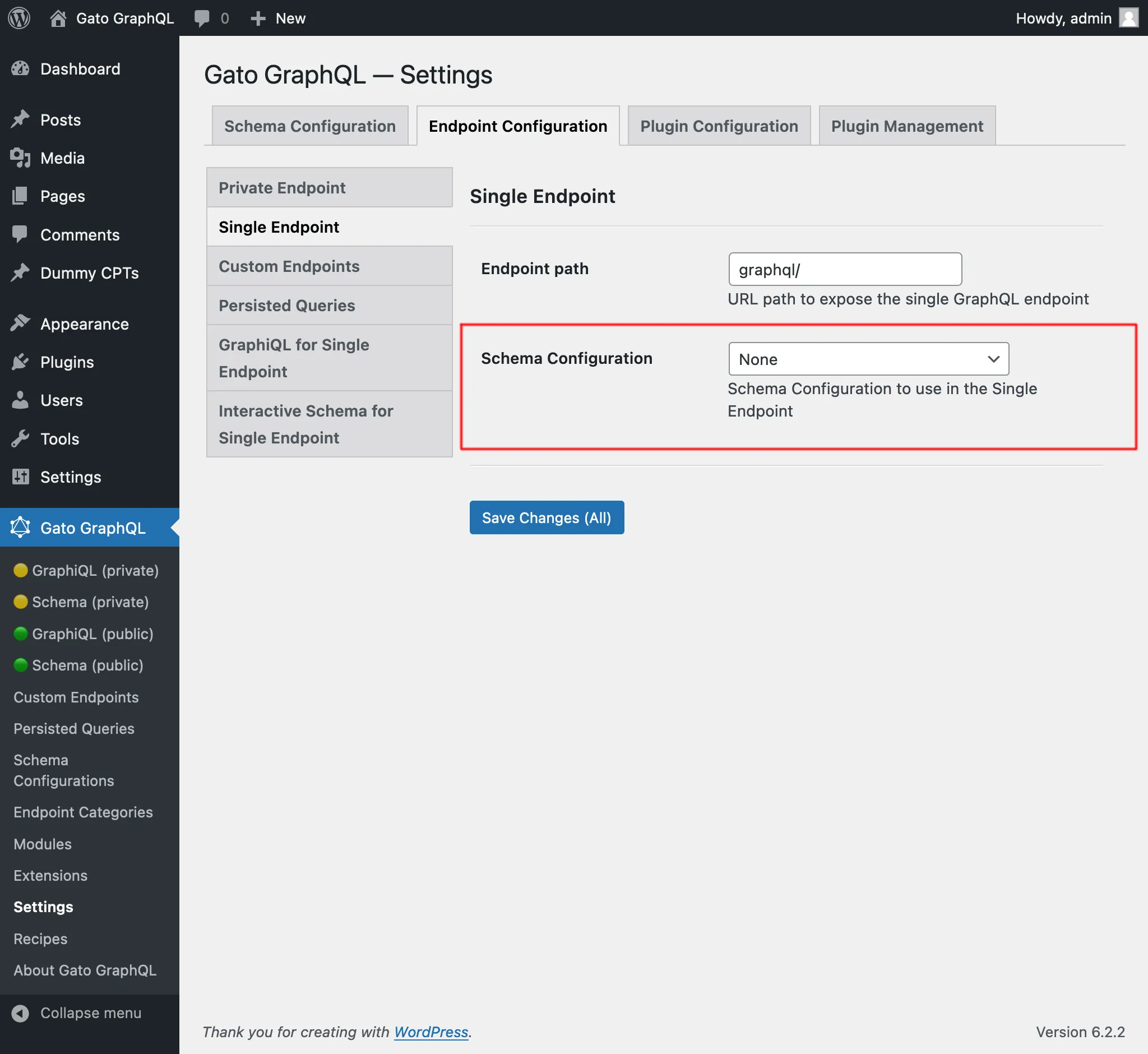\n\n</div>\n\n## Clients\n\nInteract with the single endpoint via the available clients.\n\n### GraphiQL\n\nIf module \"GraphiQL for Single Endpoint\" is enabled, then the single endpoint's GraphiQL client becomes publicly available.\n\nTo open it, click on link \"🟢 GraphiQL (public)\" on the plugin's menu:\n\n<div class=\"img-width-1024\" markdown="1">\n\n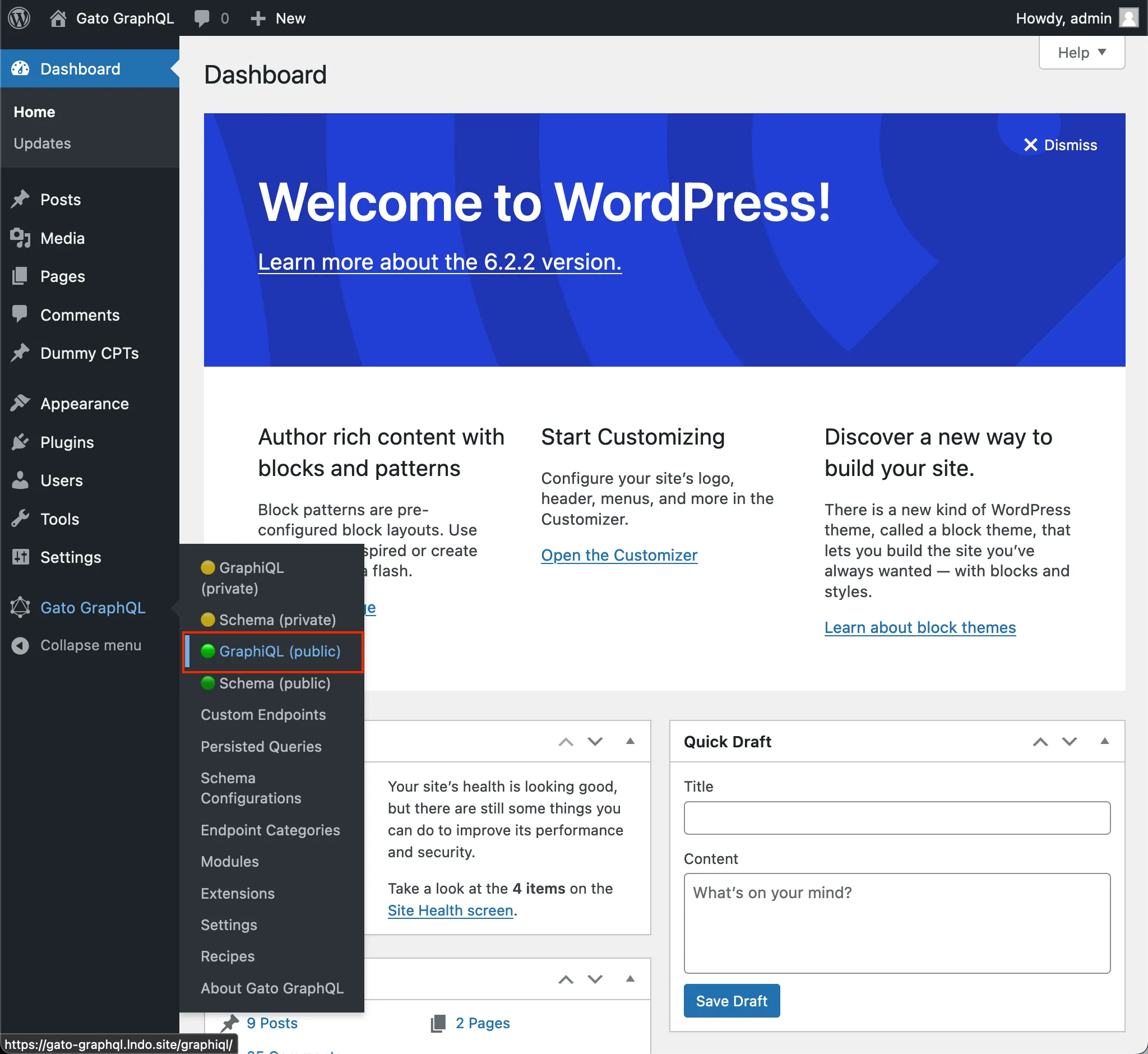\n\n</div>\n\nBy default, the client is exposed under `/graphiql/`. This path can be modified on the Settings, under tab \"GraphiQL for Single Endpoint\":\n\n<div class=\"img-width-1024\" markdown="1">\n\n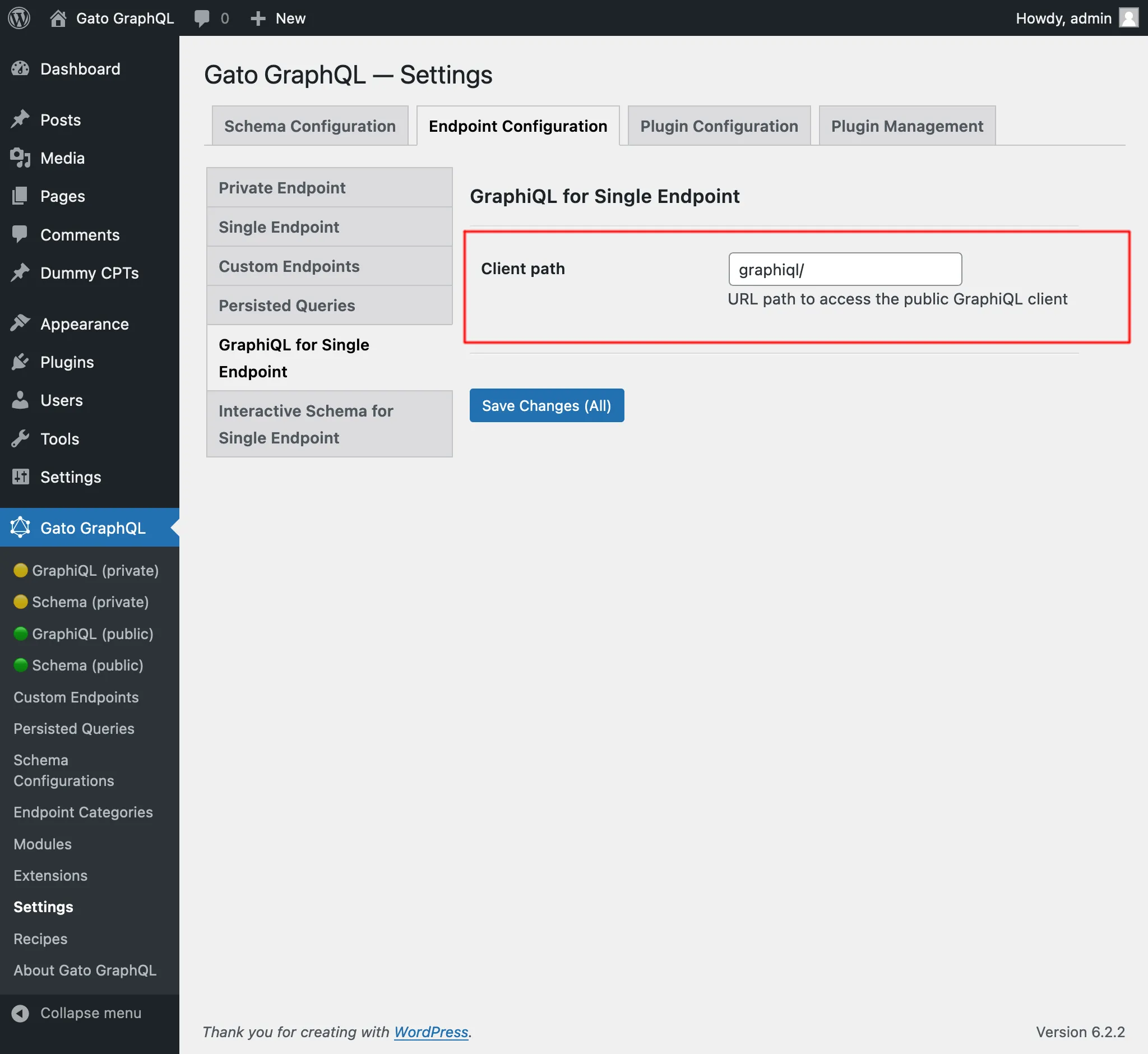\n\n</div>\n\n### Interactive Schema (Voyager)\n\nIf module \"Interactive Schema for Single Endpoint\" is enabled, then the single endpoint's Voyager client becomes publicly available.\n\nTo open it, click on link \"🟢 Schema (public)\" on the plugin's menu:\n\n<div class=\"img-width-1024\" markdown="1">\n\n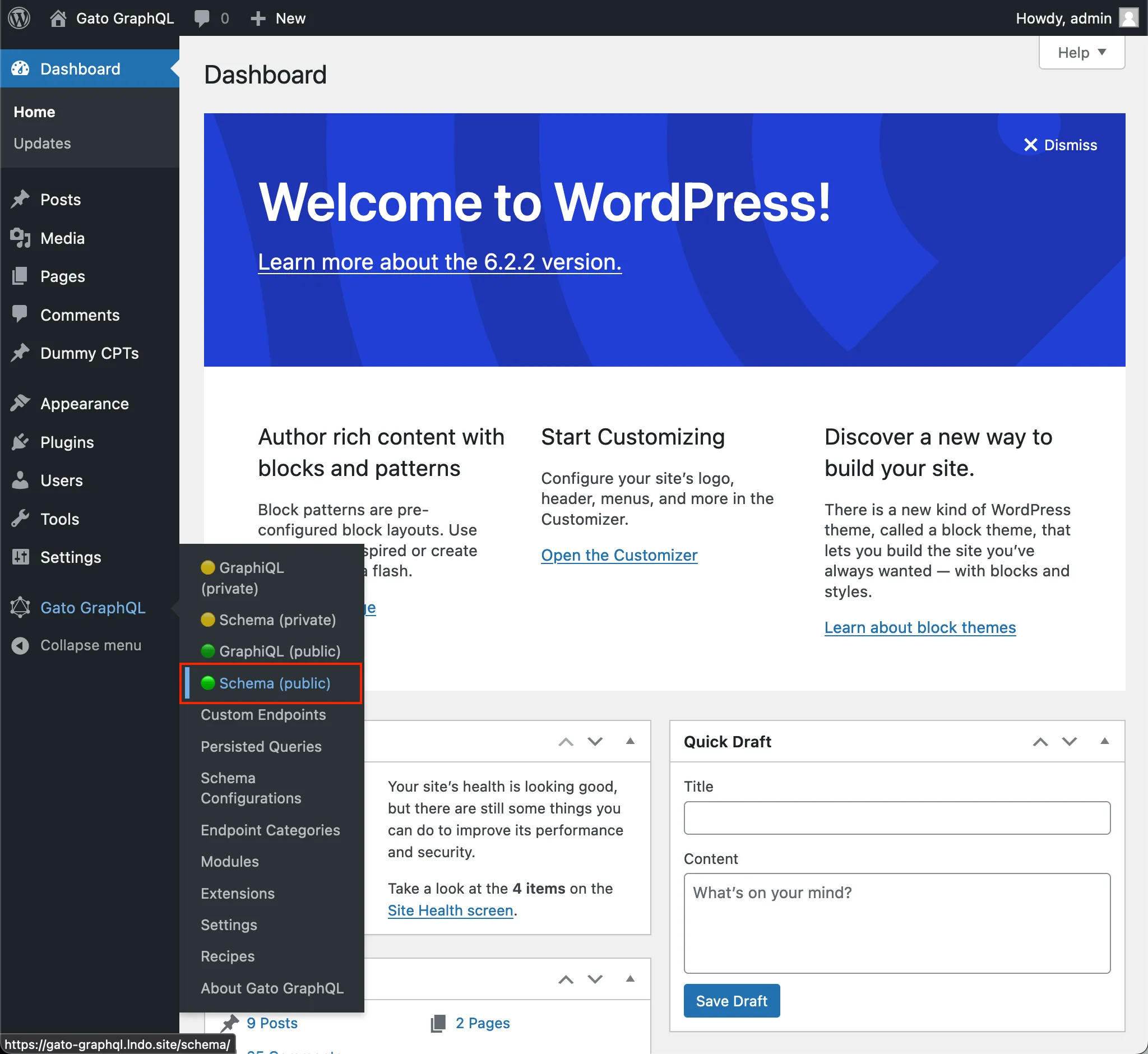\n\n</div>\n\nBy default, the client is exposed under `/schema/`. This path can be modified on the Settings, under tab \"Interactive Schema for Single Endpoint\":\n\n<div class=\"img-width-1024\" markdown="1">\n\n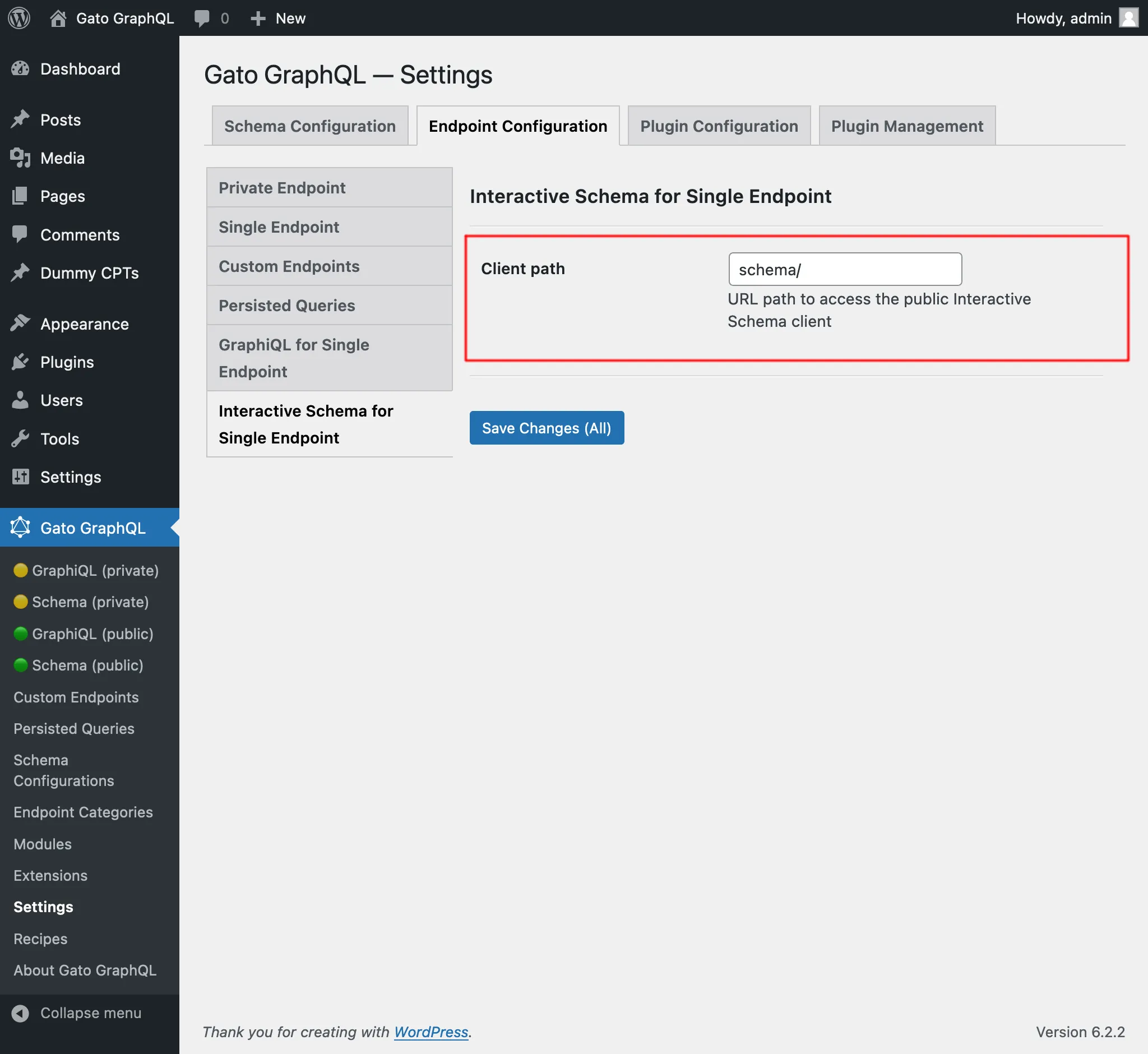\n\n</div>\n",
"translated": "# Punto final único\n\nEjecute consultas en el servidor GraphQL a través del punto final único público.\n\nDe forma predeterminada, el punto final es `/graphql/` y la ruta se puede configurar a través de Configuración.\n\n\n\nEl punto final único GraphQL se puede configurar asignándole una configuración de esquema. Para hacer esto, en la sección \"Configuración del esquema\", seleccione la entrada deseada del menú desplegable para \"Configuración del esquema para el punto final único\":\n\n<div class=\"img-width-1024\" descuento=1>\n\n\n\n</div>\n\n## Clientes\n\nInteractúe con el punto final único a través de los clientes disponibles.\n\n### GrafiQL\n\nSi el módulo \"GraphiQL para punto final único\" está habilitado, el cliente GraphiQL del punto final único estará disponible públicamente.\n\nPara abrirlo, haga clic en el enlace \"🟢 GraphiQL (público)\" en el menú del complemento:\n\n<div class=\"img-width-1024\" descuento=1>\n\n\n\n</div>\n\nDe forma predeterminada, el cliente está expuesto en `/graphiql/`. Esta ruta se puede modificar en Configuración, en la pestaña \"GraphiQL para punto final único\":\n\n<div class=\"img-width-1024\" descuento=1>\n\n\n\n</div>\n\n### Esquema interactivo (Voyager)\n\nSi el módulo \"Esquema interactivo para punto final único\" está habilitado, el cliente Voyager del punto final único estará disponible públicamente.\n\nPara abrirlo, haga clic en el enlace \"🟢 Esquema (público)\" en el menú del complemento:\n\n<div class=\"img-width-1024\" descuento=1>\n\n\n\n</div>\n\nDe forma predeterminada, el cliente está expuesto en `/schema/`. Esta ruta se puede modificar en Configuración, en la pestaña \"Esquema interactivo para punto final único\":\n\n<div class=\"img-width-1024\" descuento=1>\n\n\n\n</div>\n"
}
}
}Het is ook toegevoegd aan de sectie Recepten, onder "Translating content from URL".
Bericht vertalen (klassieke editor), en Berichten vertalen (klassieke editor)
Er waren al persisted queries "Translate post" en "Translate posts" (in bulk), die alle eigenschappen binnen de Gutenberg-blokken in het bericht vertalen.
Deze zijn terecht hernoemd naar "Translate post (Gutenberg)" en "Translate posts (Gutenberg)", en nieuwe persisted queries zijn toegevoegd om inhoud voor de klassieke editor te vertalen:
- Translate post (Classic editor): Eén enkel bericht vertalen
- Translate posts (Classic editor): Meerdere berichten tegelijk vertalen, in bulk
Al deze queries vertalen inhoud door de Google Translate API aan te roepen en alle gegevens binnen één verzoek te versturen.
Als je dan de query "Translate posts (Classic editor)" gebruikt om 5 berichten te vertalen, worden alle gegevens (titel, inhoud en samenvatting) van alle 5 berichten samen verstuurd, wat een rijke context oplevert die zorgt voor een grotere nauwkeurigheid bij de vertaling.
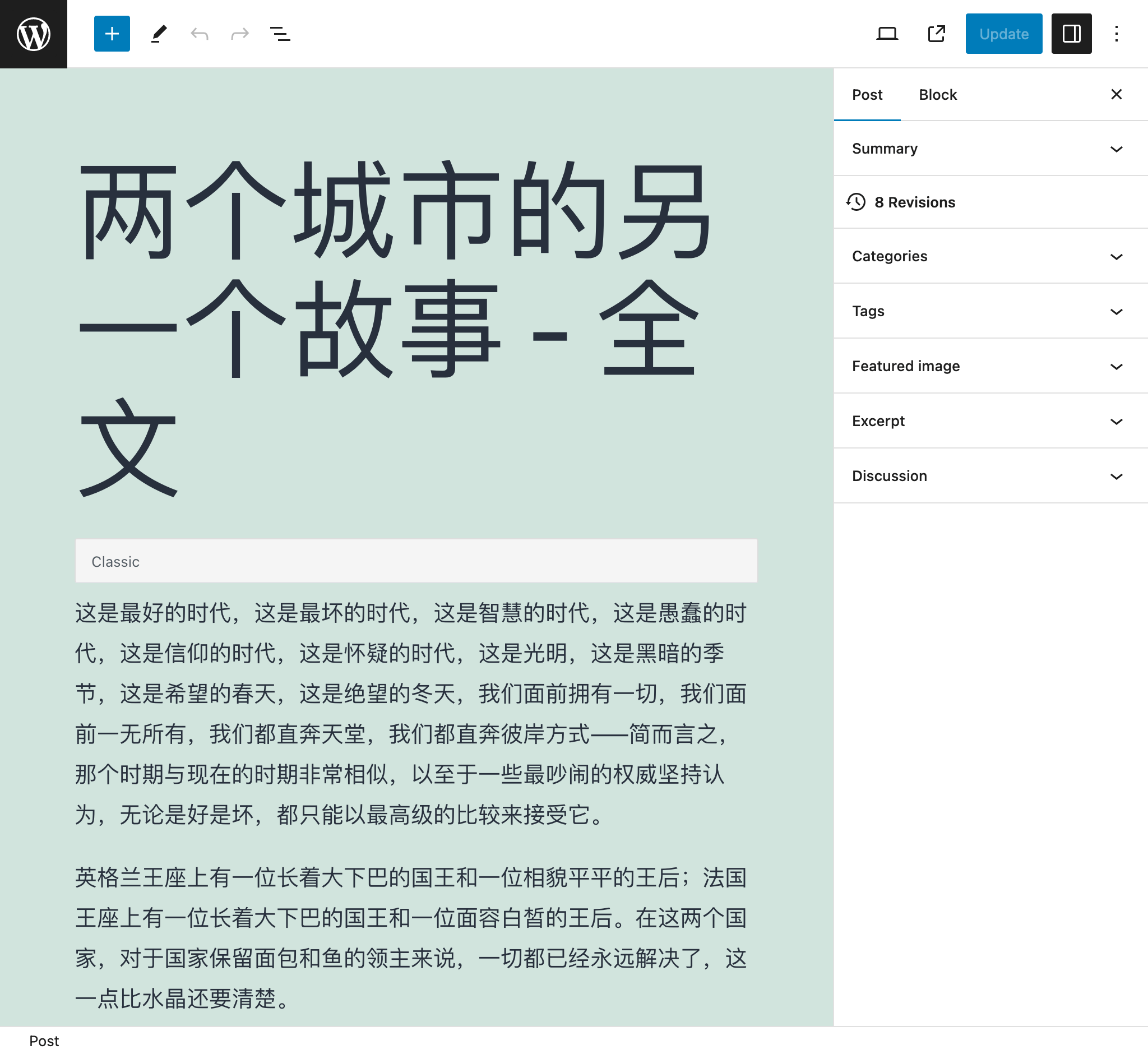
Na het vertalen van dit bericht van het Engels naar het Chinees bijvoorbeeld:
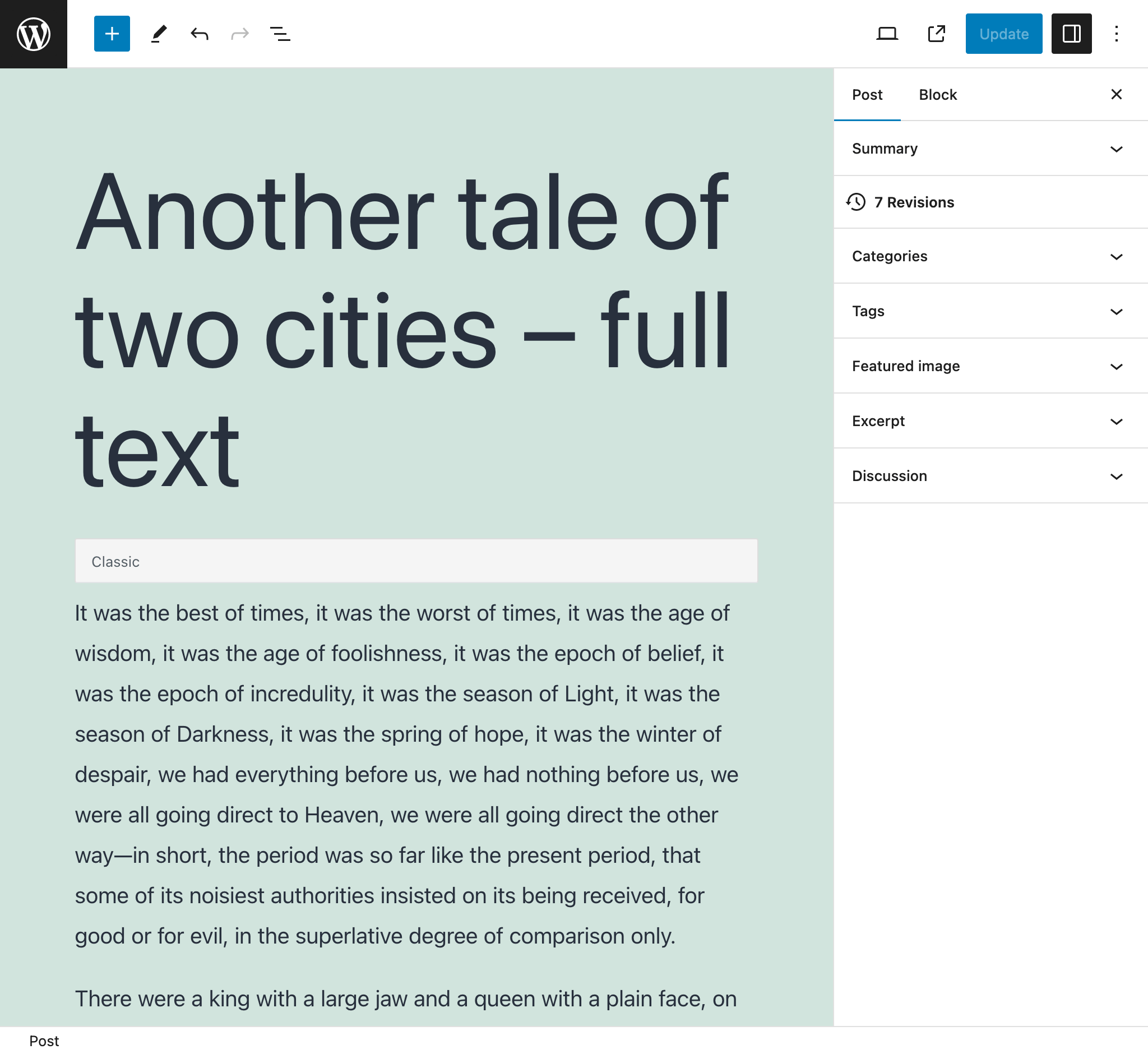
...zag het er zo uit:
Bericht importeren uit WordPress RSS-feed
Wijs naar de WordPress RSS-feed van een bericht en maak een nieuw bericht aan met de bijbehorende gegevens.
De query verwerkt bijvoorbeeld de volgende RSS-feed voor één enkel bericht (normaal toegankelijk via https://mysite.com/post-slug/feed/rss/?withoutcomments=1):
<?xml version="1.0" encoding="UTF-8"?>
<rss version="2.0"
xmlns:content="http://purl.org/rss/1.0/modules/content/"
xmlns:wfw="http://wellformedweb.org/CommentAPI/"
xmlns:dc="http://purl.org/dc/elements/1.1/"
xmlns:atom="http://www.w3.org/2005/Atom"
xmlns:sy="http://purl.org/rss/1.0/modules/syndication/"
xmlns:slash="http://purl.org/rss/1.0/modules/slash/"
>
<channel>
<title>A tale of two cities – teaser – PoP API Demo</title>
<atom:link href="https://mysite.com/blogroll/a-tale-of-two-cities-teaser/feed/?withoutcomments=1" rel="self" type="application/rss+xml" />
<link>https://mysite.com</link>
<description>Just another WordPress site</description>
<lastBuildDate>Tue, 20 Jul 2021 23:03:59 +0000</lastBuildDate>
<language>en-US</language>
<sy:updatePeriod>hourly</sy:updatePeriod>
<sy:updateFrequency>1 </sy:updateFrequency>
<generator>https://wordpress.org/?v=6.1.1</generator>
<item>
<title>A tale of two cities – teaser</title>
<link>https://mysite.com/blogroll/a-tale-of-two-cities-teaser/</link>
<comments>https://mysite.com/blogroll/a-tale-of-two-cities-teaser/#comments</gidsen/query/opmerkingen>
<dc:creator>leo</dc:creator>
<pubDate>Mon, 21 Dec 2020 08:24:18 +0000</pubDate>
<category>Blogroll</category>
<category>championship</category>
<category>book</category>
<guid isPermaLink="false">https://mysite.com/?p=1657</guid>
<description></description>
<content:encoded>
<p>It was the best of times, it was the worst of times, it was the age of wisdom, it was the age of foolishness, it was the epoch of belief, it was the epoch of incredulity, it was the season of Light, it was the season of Darkness, it was the spring of hope, it was the winter of despair, we had everything before us, we had nothing before us, we were all going direct to Heaven, we were all going direct the other way—in short, the period was so far like the present period, that some of its noisiest authorities insisted on its being received, for good or for evil, in the superlative degree of comparison only.</p>
</content:encoded>
<wfw:commentRss>https://mysite.com/blogroll/a-tale-of-two-cities-teaser/feed/</wfw:commentRss>
<slash:comments>45</slash:comments>
</item>
</channel>
</rss>Berichten importeren uit CSV
Geef een CSV-bestand op om berichten aan te maken met de bijbehorende gegevens voor elke invoer (de titel, samenvatting, inhoud en auteur).
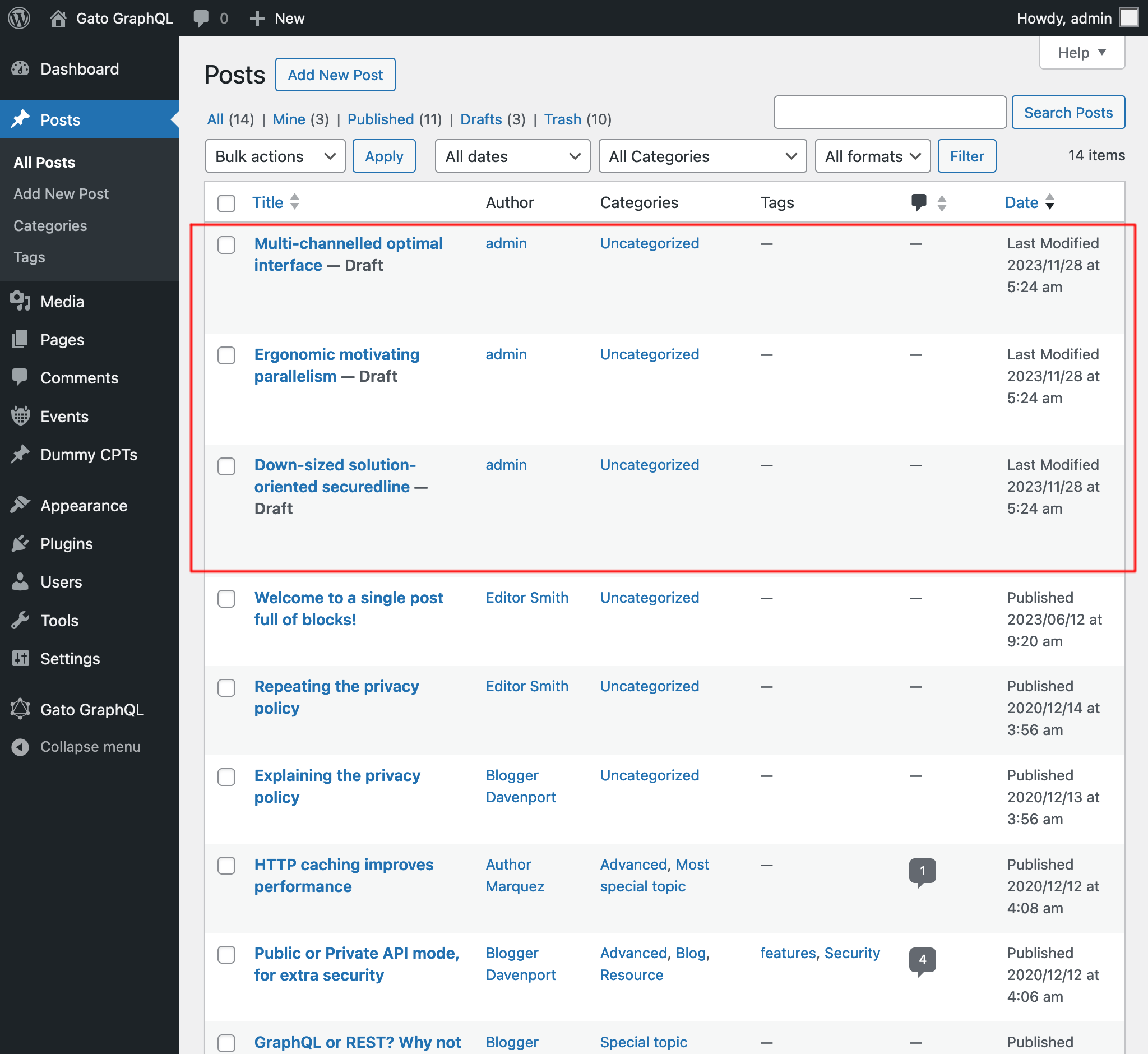
Het onderstaande CSV-bestand maakt bijvoorbeeld 3 berichten aan:
Title,Excerpt,Content,Author
Multi-channelled optimal interface,Inventore iste velit et expedita ipsa dolor,"<!-- wp:paragraph -->
<p>Inventore iste velit et expedita ipsa dolor. Optio suscipit qui id harum corporis dignissimos.</p>
<!-- /wp:paragraph -->",admin
Ergonomic motivating parallelism,Consequuntur velit quasi assumenda,"<!-- wp:paragraph -->
<p>Consequuntur velit quasi assumenda. Eum non saepe est. Ut dolorem harum eveniet eaque nemo impedit. Voluptatem commodi modi sed sed animi voluptatem.</p>
<!-- /wp:paragraph -->
<!-- wp:image {""id"":5,""sizeSlug"":""large""} -->
<figure class=""wp-block-image size-large""><img src=""https://mysite.com/wp-content/uploads/2023/09/wordpress0.jpg"" alt="""" class=""wp-image-5""/></figure>
<!-- /wp:image -->
<!-- wp:image {""id"":7,""sizeSlug"":""large""} -->
<figure class=""wp-block-image size-large""><img src=""https://mysite.com/wp-content/uploads/2023/09/wordpress2.jpg"" alt="""" class=""wp-image-7""/></figure>
<!-- /wp:image -->",admin
Down-sized solution-oriented securedline,Ipsam minima qui asperiores dolorum unde voluptas quia voluptate,"<!-- wp:paragraph -->
<p>Ipsam minima qui asperiores dolorum unde voluptas quia voluptate. Incidunt omnis cumque beatae quo deleniti ex. Praesentium nihil et consectetur neque commodi tempora ipsa adipisci. Praesentium perferendis sint est.</p>
<!-- /wp:paragraph -->
<!-- wp:paragraph -->
<p>Et aut fuga aliquam consequuntur dolore sunt ut ut. Quibusdam in voluptas vitae quia eaque. Eligendi dolorum dolorem vitae et vitae et ut.</p>
<!-- /wp:paragraph -->",admin
Na het uitvoeren van de query krijgen we de resultaten:
Berichtlinks ophalen
Zoek alle links in alle berichten (door te zoeken naar alle <a href="(...)">(...)</a>-strings) en geef ze weer in de respons als een JSON-object met eigenschappen { href: (...), text: (...) }.
Dit kan bijvoorbeeld de volgende respons opleveren:
{
"data": {
"posts": [
{
"id": 1435,
"title": "Citations from famous authors",
"links": [
{
"href": "https://www.azquotes.com/author/4085-Fyodor_Dostoevsky",
"text": "Quote by Fyodor Dostoevsky"
},
{
"href": "https://www.azquotes.com/author/14706-Leo_Tolstoy",
"text": "Quote by Leon Tolstoi"
},
{
"href": "https://www.azquotes.com/author/15138-Voltaire",
"text": "Quote by Voltaire"
}
]
},
{
"id": 1,
"title": "Hello world!",
"links": []
}
]
}
}Scalair type XML toegevoegd
We kunnen nu XML-strings invoeren via het nieuwe scalaire type XML, dat de juistheid van de XML-string valideert.
Deze query bijvoorbeeld:
{
_strDecodeXMLAsJSON(xml: """<?xml version="1.0" encoding="UTF-8"?>
<body>
<message>Hello world!</message>
</body>
""")
}...geeft als resultaat:
{
"data": {
"_strDecodeXMLAsJSON": {
"message": "Hello world!"
}
}
}Terwijl deze query:
{
_strDecodeXMLAsJSON(xml: """<?xml version="1.0" encoding="UTF-8"?>
<body>
<message>Hello world!</message>
""")
}...het volgende oplevert:
{
"errors": [
{
"message": "Cannot cast value '<?xml version=\"1.0\" encoding=\"UTF-8\"?>\n <body>\n <message>Hello world!<\/message>\n ' for type 'XML'",
"locations": [
{
"line": 2,
"column": 31
}
],
"extensions": {
"field": "_strDecodeXMLAsJSON(xml: \"<?xml version=\"1.0\" encoding=\"UTF-8\"?>\n <body>\n <message>Hello world!<\/message>\n \")",
"problems": [
"Premature end of data in tag body line 2\n"
]
}
}
],
"data": {
"_strDecodeXMLAsJSON": null
}
}Verbeterde documentatie
- Documentatie toegevoegd voor nieuwe velden van de extensie Helper Function Collection:
_strDecodeXMLAsJSON_strParseCSV
Opgelost
- In de vooraf gedefinieerde persisted queries "Translate post" en "Translate posts" is
failIfNonExistingKeyOrPath: falsetoegevoegd bij het selecteren van de eigenschapattributes.{something}van een blok (omdat die soms niet gedefinieerd kan zijn) - In de vooraf gedefinieerde persisted query "Import post from WordPress site" is de status
anytoegevoegd om het bericht te selecteren - De persisted query "Translate post" is hernoemd naar "Translate post (Gutenberg)", en "Translate posts" naar "Translate posts (Gutenberg)"